

*blows thick layer of dust off of blog*
The Arrival
Exactly nine days ago, my very first dedicated e-reader arrived on my doorstep, waiting to immerse me into the uncharted territory of e-ink displays and batteries that last weeks on a charge.
And while I will not go so far as to say I fell in love with it at first sight, just nine days with the Paperwhite has convinced me that it is the best purchase I’ve made for myself in a long time.
The Elephant in the Room
I never thought I would own a dedicated e-reader. I tried iBooks when the very first iPad was released, and shortly into reading “Tales of a Traveling Salesman” for my high school English class, I was convinced it was pointless. Reading on a bright display slowed me down when I read, and why would I read a book at all when this new game called “Angry Birds” was on my home screen begging to be played. Reading on a tablet was too distracting.
I was also a book purist: the best way to read a book was holding it in your hands, feeling the immense weight of the 800-page novel you’re working your way through, and smelling the pages of a brand new book were things technology could never replace. I have a bookshelf of books piling up that I’ve been meaning to read for years, and still they collect dust because I “do not have any time to read them.”
Or so I thought.
More Reading, Better Reading
When the Kindle arrived, I was nervous. Had I just blown $120+ on an e-reader that came with no books when I had a stack of perfectly good books on hand waiting to be read?
The answer in my case was “no.” This money was the best, most productive spending I have done in a long time. Since I started college in 2013, I’ve made a goals list every single semester with milestones I want to hit by the time finals roll around. On every goals list I wrote, the objective to read one book, any book, was present. After nine semesters (has it really been that long???) a total of 0 books were checked off my reading list. Thanks to the Kindle, I will be finishing the first recreational book of my college career in about two weeks flat. What book was it exactly?
Go big or go home.
Stephen King’s “It” seemed like a worthy contender. I chose the brick of a novel for a variety of reasons. The first was that it was a book I have been meaning to read since the movie released last summer. The second was the length of the book: if I could read this behemoth of a novel, any book after it would look like child’s play. The third is that this novel shows the strength of the Kindle: I could carry this massive story around with me in a device small enough to fit in my back pocket. Carrying the physical copy of the book from home to work to school would be nearly impossible on top of the weight of textbooks I already carry.
After these short few days with the Kindle, I am happy to say that I am over 70% through “It,” around 800 pages through the 1150 page jaunt. Now, you might be asking yourself “Uh, how did this device make you read so much more in a drastically short amount of time?”
You know those few minutes in between different tasks where you can’t get any work done so you take out your phone and waste time on Facebook and Twitter? I replaced checking in on my friends with checking in on Pennywise the Dancing Clown. (*spoiler* he’s usually killing people. soooo many people) Of course, there were some times where I read at home or during my break between classes or during meals, but the difference was the extra moments I had in between the hustle and bustle.
The point is, having a pencil-thin screen that holds massive novels is so convenient that books can become part of the in-between where phones have dominated. Not only am I finally reading more, having a device that basically does one thing helps me unplug from the constant pull of the internet. The Kindle has allowed me to take that time back, making this purchase worth every penny(wise the dancing clown).
The Kindle Itself
As you can probably already tell, I love my Kindle. But my experience with it tells you nothing about the device itself.
The next section of the review will answer your questions about the operation and quality of the device; where it excels and where it falters.
Build Quality
The Kindle Paperwhite is a simple, white or black rectangle with very little in the way of buttons or switches; in fact, there is a single button on the entire device used for putting the device to sleep and awakening the device. The e-ink screen is recessed, a design choice that comes with both its positives and negatives. I’ll give you the good news first. This choice was probably made because a recessed display makes it less likely to be scratched if the device is placed or falls face down. It adds a buffer which protects the screen from the elements. That said, I have not had a case on my Kindle and it gets a few markings when I put it in my bookbag. Nothing permanent, but it happens.
There is only one reason the recessed display bugs me a bit. It is a small qualm, but a real one. The way the bezel and the screen connect leaves a bit of a gap where lint and other material can get stuck. I am definitely taking the Kindle to the beach, but I already can tell I am going to spend a lot of time cleaning sand out of the gap around the screen and hopefully not scratching it to bits in the process.
I am overwhelmingly pleased with the quality of the device. For an all plastic build, it feels premium in the hand without feeling too weighty. It also withstood a four-foot fall from a counter onto the hard tile of the cafe I work at. My coworker felt awful, but honestly had she not told me it happened I would have never known. There is not a single scuff anywhere I can find. For an impromptu drop test, the Kindle performed incredibly well.
Software/User Interface
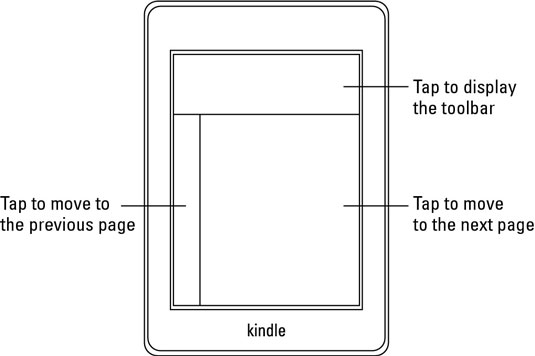
Here is where things get a little bit weird. The Kindle’s interface and software are simple almost to a fault. Since the only button on the device wakes it up, digital buttons and gestures are needed to use the device. Unfortunately using the device takes quite a bit of getting used to, something that could have been amended with a quick tutorial. When I opened “It” and started reading, leaving the book to go look at the Amazon bookstore was tougher than it should have been. Here is what happened:
- Swipe left: The page turned back. That is how I learned the screen supported swiping
- Swipe down: Nothing happened
- Swipe up from the bottom: Nothing again.
- Take out phone, use Google to find the answer
I found a helpful diagram that basically painted the screen with three invisible barriers. The bottom two-thirds of the screen are split in half. Tapping or swiping these sections turns pages. The top third of the screen hides and reveals the toolbar used for navigation. Again, a quick little “how-to” would have been very helpful. I was not alone. Everyone I handed the Kindle to fooled around with it for a minute or two and handed it back, usually accompanied by “I don’t know how to use this, so here you go. Also I think I lost your page.” They did, in fact, lose my page consistently.
Once you figure out the design, it makes a lot of sense and you likely won’t forget how to use it any time soon.
The software runs well enough, and the only thing holding it back is the refresh-rate on the e-ink display. It overall is quick, but it hiccups every now and then. Not a major issue, and it is almost always faster than turning the page of a real book, but users online have said it slows down over time. How drastically, I will have to monitor and update as time goes on.
Overall the software works well because it only has to do one thing: render ebooks. In fact, besides downloading books from Amazon or looking for your next book on Goodreads (it has built-in integration) there is little else you can do with it. There is, technically an “experimental browser” hidden in the settings menu, but you definitely do not want to do heavy web surfing on the Kindle.
Screen
Initially, I was going to put the screen in the build quality section, but as it is the bulk of the device, I felt it needed a dedicated area to talk about it.
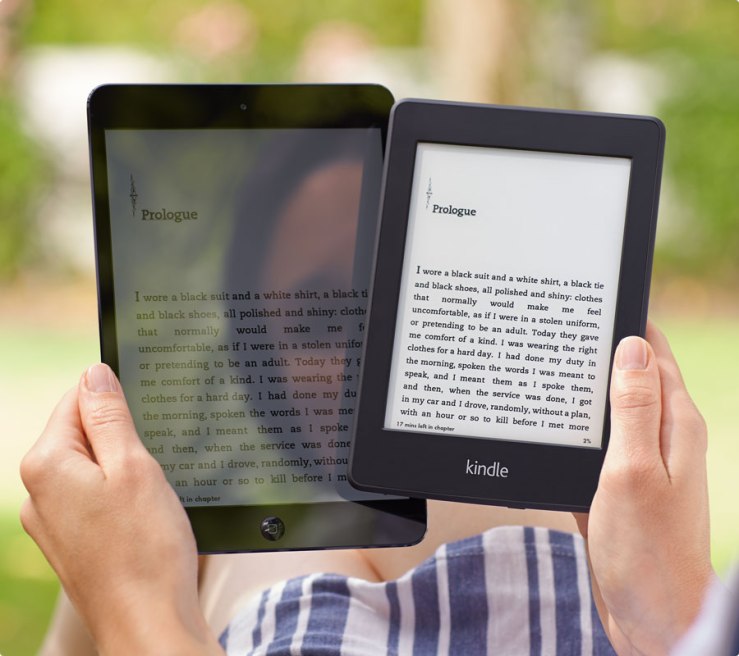
The six-inch e-ink display is gorgeous. The matte finish and the 300ppi resolution get as close to the page of a book as a screen can get, a true feat. Everyone who I show the Kindle says “It actually looks like a piece of paper!” Where the display beats paper though, is the four-LED front light that illuminates the screen from the front, not the back; an important design choice.
Backlit devices can only be viewed in average light situations. Think of your phone, and how hard it is to use outside. The Kindle, on the other hand, relies on light being pointed at it from either exterior light or the front light. This means you can use it anywhere; in pitch black darkness under the covers or on the beach without straining your eyes.
Of the 10 levels of brightness, I leave mine on level 4 so I can walk between dimmer areas and brighter areas without feeling like I need to consistently adjust the light. I honestly felt like anything higher than level six was blinding. The lights provide plenty of brightness.
Battery
I cannot tell you how refreshing it is to use a device that does not require a charge each and every night. In fact, I don’t have to charge it every other night either. The 50% battery the Kindle arrived with lasted a full seven days before requiring a charge. Amazon advertises the battery as able to last for “weeks,” and based off my experience using the light and WiFi the whole time, I believe it. Usually in reviews, I would say how many hours it took to kill the battery, but I literally cannot because the first full charge is still going. It is very good. I will leave it at that.
Wrap-Up
The Kindle Paperwhite is a wonderful device because it only does one thing exceptionally well: lets you read books, uninterrupted. Where smartphones have absorbed almost every device into one i.e. cameras, mp3 players, web browsers, etc. the Kindle is a refreshing change to normal all-in-one devices. The e-ink display is perfect for reading anywhere, the software allows you to cut out distractions and focus on the story in front of you.
I plan on carrying my Kindle Paperwhite with me most places I go because of its convenient size and weight, and I hope it lets me keep up the trend of reading in my downtime, a goal I have waited far too long to address. It has become my new favorite device, and I cannot recommend one enough.
That is why I give it an:
8.5/10
 Tech2Dump